Changing web supplier is not a technical problem. It is an access problem, decided months earlier — by whose name is on the domain, whose card renews the hosting, and whether the person who built the site is the only one who can log into it.
This is the list I work through, in order, whether you are moving to another agency, bringing the work in-house, or simply want to know where you stand. The order matters: the items at the top cannot be recreated once a relationship turns cold.
A handover is a list of accounts, not a folder of files
Almost every handover I am asked to review arrives as a folder: a zip of the theme, a database dump, a password list in a spreadsheet. Files can be rebuilt — a site lost entirely can be recovered from a staging copy or a crawl, painfully and billably.
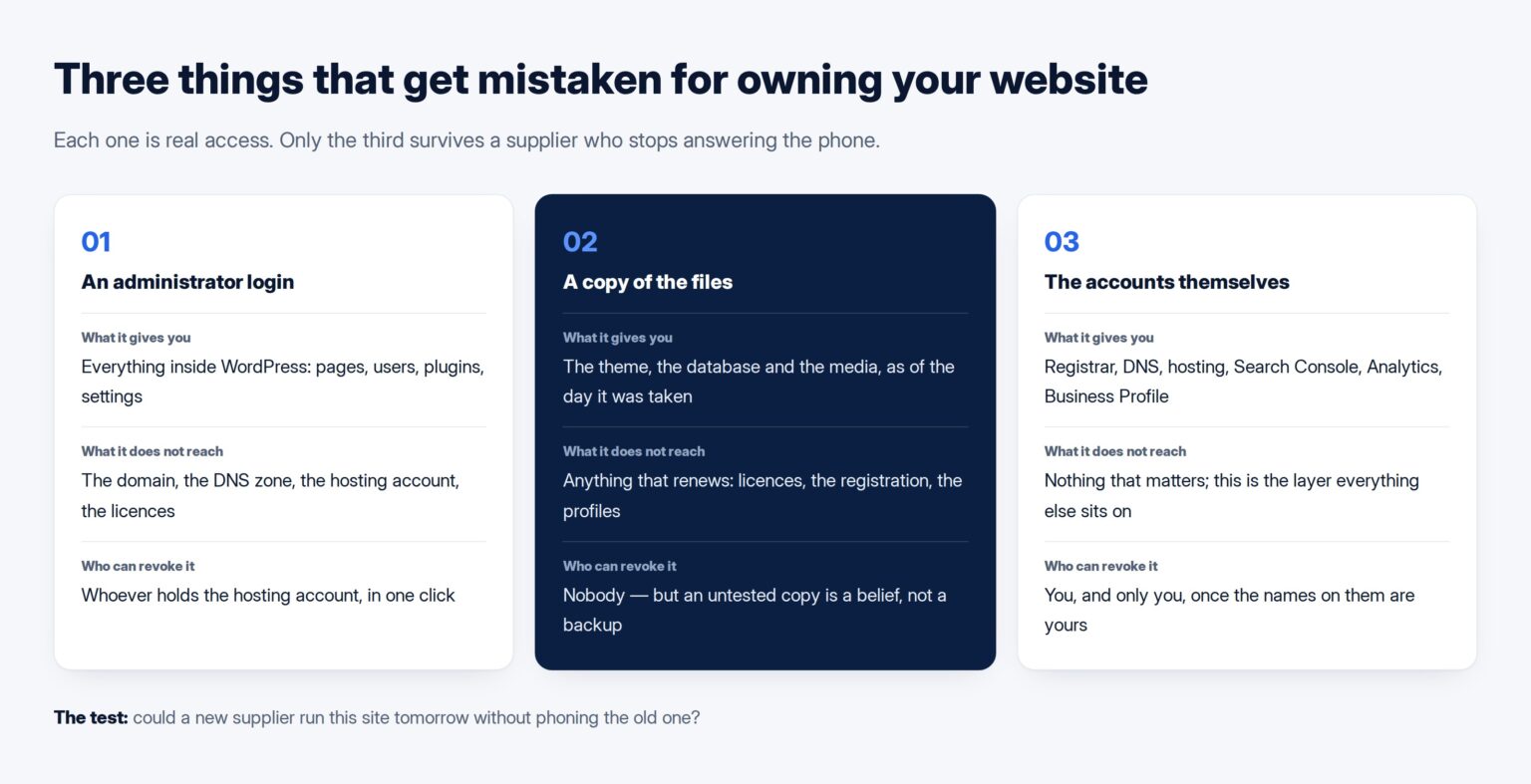
Accounts cannot, and the first question is therefore not “where is the code” but which of these accounts is in our name, with our address on it and our card paying for it? If the domain is registered in your former supplier’s name, no goodwill from the new one gets it back quickly. If your Business Profile was verified on the personal address of someone who has left the country, the reviews attached to it are not yours to move. These are what turn a two-week supplier change into a four-month one, and all of them are administrative rather than technical.
The domain, because nothing else matters if you lose it
The domain is the only genuinely irreplaceable item here. Your mail runs on it and every link anyone has made to you points at it.
Two roles matter and they are not the same. The registrant is the legal holder; the administrative contact manages it day to day. A supplier who registered it for you may have put themselves in both. You want the registrant to be your company, on an address that survives an employee leaving.
Moving a domain between registrars needs an authorisation code — the AuthInfo or EPP code — which the current registrar must make available to the registrant. ICANN’s guidance for registrants sets out the process and names the trap: a change of registrant can place a 60-day lock on the domain, during which it cannot be transferred to another registrar. Correcting the ownership record mid-handover can therefore freeze the domain for two months at the worst moment, so fix it while things are calm.
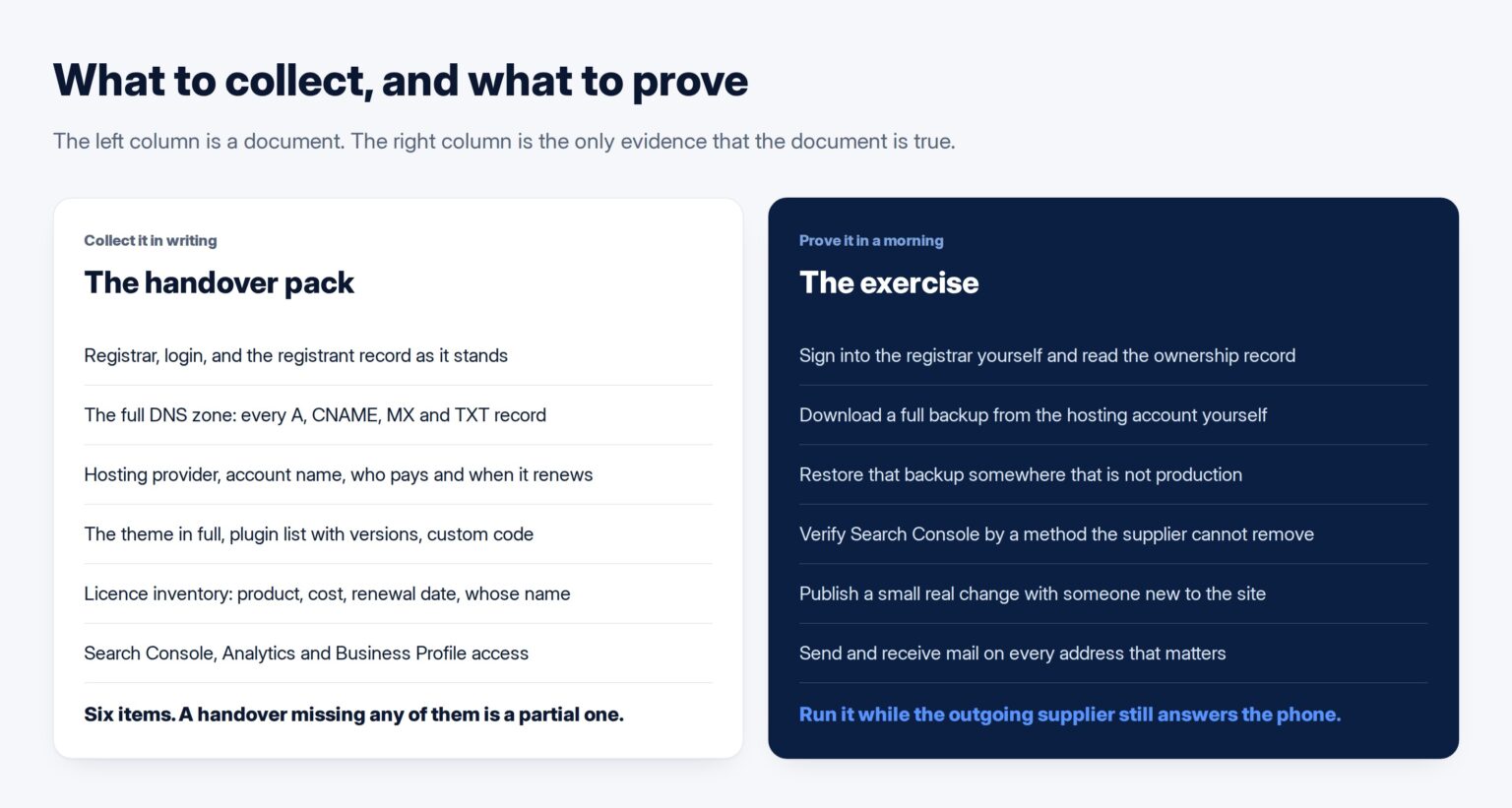
Ask for three things: the registrar and the login, the registrant record as it stands, and confirmation that the domain is unlocked with the code available on request.
DNS, quieter and just as decisive
DNS says where the domain points — the website here, the mail there, a verification record somewhere else. It lives either at the registrar or at the hosting panel, and in plenty of setups nobody can say which without looking it up.
Ask for the whole zone, not a summary: every A, CNAME, MX and TXT record as it stands today. The TXT records are the ones people forget and they are load-bearing — mail authentication lives there, and so does the token proving to Google you own the site.
Control DNS yourself and you can move hosting, change supplier, verify a search property and reroute mail without anyone’s permission. It is the piece of leverage most businesses do not know they gave away.
Hosting: an account, or a folder inside someone else’s
There is a real difference between the two, and both look identical from outside. Only one can be handed over.
If the site sits in a reseller account, the supplier cannot give you the login without exposing their other clients, so you will be offered a copy of the files and the database instead. That is workable, but it makes the change a migration rather than a handover, with downtime risk and a new bill attached.
Ask for the provider, the account name, whose card renews it and when. Hosting paid by a developer who is about to stop working with you is a bill that will simply go unpaid one morning.
Backups belong here. A backup is the files and the database together, as the WordPress backup documentation spells out; a dump of the database alone restores your text and loses your images, theme and settings. Ask when the last restore test was; the honest answer is usually “never”.
An administrator account is not ownership
Being handed an administrator login feels like being handed the keys. It is closer to one key. The administrator role can do everything inside the site — but the site lives in a hosting account, under a domain, behind a DNS zone, and that role reaches none of them.
Two rules. Your company holds an administrator account that is not shared, is on a company address, and is not the one the supplier uses. And decide deliberately what happens to the supplier’s account: leaving it is reasonable if they still do the maintenance, unreasonable if they do not.
Read the user list before signing anything off. Old developers, a plugin vendor’s support account, an intern from 2023 — each is a way in nobody is tracking.
The code, and the only question worth asking about it
You do not need to read the code. You need to know whether somebody else could run it.
For WordPress that means the theme in full including any child theme, a written list of plugins with versions, and any custom code outside the theme, which is where the surprises are. If the build rests on a page builder or a proprietary framework, that has to come too, and its licence decides whether it can — a decision taken at the start of a project, not at the end.
The test fits in one sentence: can a competent developer who has never seen this site take what you are giving us and have it running on a new server? If the answer involves a phone call to someone specific, you have a dependency, not a handover.
Licences, which renew on somebody else’s card
Premium plugins, a theme licence, a forms service, an SMS gateway: each was bought by whoever set the site up, usually on their own account.
When those licences stop being paid nothing breaks that day, which is what makes this the commonest delayed failure after a supplier change. The plugin stops receiving updates, and months later it is the component holding the site hostage: unpatched and welded into a page nobody wants to rebuild.
Ask for an inventory — product, where it was bought, annual cost, renewal date, whose name it is in — then rebuy the ones you intend to keep under your own account before the relationship ends.
The three accounts that hold your history
Three accounts hold measurement history that cannot be backdated, and all three are routinely lost because they were created on whichever Google account the agency was signed into.
Search Console. A verified owner proved ownership with a token such as a file or meta tag; a delegated owner was simply granted access by one. Google states that a property must have at least one verified owner or nobody has access at all. So if your only verification is a file the supplier uploaded, your claim to your own search history rests on that file staying put. Verify separately by DNS and it stops being a risk.
Analytics. Access is granted per property, so make sure a named person at your company holds it at the highest level.
Google Business Profile. Different in kind, because the reviews attached to it are the asset and they do not move. Verification is what confers ownership, so the account that verified it owns it — and the profile is often the first thing a Kuwaiti customer sees.
Email, the one that takes the business down
On most small Kuwaiti setups the site and the mailboxes share a hosting account, so a hosting move is a mail move whether anyone planned it or not. An hour of web downtime is embarrassing; an hour of mail downtime is a quotation nobody received.
Treat mail as its own project: list the mailboxes and forwarders, note which are aliases, export what matters, lower the TTL on the MX records before the move, and switch on a quiet evening rather than alongside the website. If the mailboxes are staying and only the site is moving, put that in writing.
The test that proves a handover happened
A handover document is not evidence. Exercise it while the outgoing supplier is still answering the phone:
- Log into the registrar with your own credentials and read the registrant record.
- Log into the hosting account yourself and download a full backup.
- Restore that backup somewhere that is not production, and open the site.
- Sign into Search Console as a verified owner, by a method the supplier does not control.
- Have somebody who has never touched the site publish a small real change.
Five steps, a morning’s work. Pass all five and you can change supplier whenever you choose, which also changes the terms on which you stay. Fail one and you have found it today rather than on the worst possible day.
Handover terms belong in the contract at the start, beside the ownership clause most proposals never mention, and the arrangement that follows should say what happens when it ends — the clause most often missing from a maintenance retainer. This list is what I hand over on a WordPress build: a supplier comfortable with being replaced is usually the one worth keeping. Where a handover exposes a build too tangled to move, untangling it is its own piece of work, and Tothiq does that kind of rebuild across the GCC.
Frequently asked questions
Our supplier says the website is on their server. Is that normal?
It is common and not automatically wrong — a managed environment a supplier knows well is often safer than a cheap account you bought yourself. What matters is that you know it means a migration if you leave, and that the domain and DNS are yours.
They want to keep an administrator account after the handover. Should we allow it?
If they are still maintaining the site, yes — they cannot do the work without it. If the relationship has ended, no, and the account should be removed rather than left inactive. Every administrator account should belong to somebody you can name whose current role justifies it.
We never signed anything about ownership. What do we actually own?
Your content, your data and your domain registration are yours in practice. Custom code written for you may not be, and without a written assignment the position is unclear rather than in your favour. Third-party licences are never yours. That part is a question for a lawyer, but the practical move is the same either way: get the accounts into your name now, and settle the code question in writing before the next project starts.
How long should a handover take?
Where the accounts are already in the client’s name, an afternoon. Where they are not, allow four to six weeks, because ownership changes run on other people’s timetables — a registrar’s verification step, a transfer lock, a Google review. That gap is the argument for doing this while you are happy with your supplier.
Do we have to move hosting in order to change supplier?
No, and often you should not. If the hosting account is genuinely yours, a new supplier can simply be given access, which removes the riskiest part of the change. Move hosting only when the account is not yours, when the environment is the actual problem, or when the cost is indefensible.