The question gets asked as a design question. Should we use a ready-made theme, a page builder, or have it built from scratch? And it gets answered with mockups, which is why it is usually answered wrongly.
It is not a design question. All three routes can produce the same-looking site. What differs is what you can still change in year three without paying for the whole thing again, and where your content is when you decide to leave. Judge it on that and the choice becomes clear, usually in under an hour.
The distinction the whole decision rests on
WordPress has a rule about itself, and it is stated in its own handbook in one line: themes control the presentation of content, plugins control the behaviours and features of your site. The plugin handbook completes it from the other side — anything you want to add or modify should be done with a plugin.
That sounds like an internal technical convention. It is actually the sentence that determines whether changing how your site looks in three years is a weekend or a rebuild. If your appointment booking, your testimonials, your team profiles and your product listings live in the theme, then changing the theme deletes them. If they live in plugins and in ordinary posts and pages, the theme is a coat you can take off.
So the first question to ask any supplier, whatever route they propose, is where each feature will live. Not how it will look. Where it will live.
Where your words actually are
WordPress stores the content of a page as text in one database field. In the block editor, that text is ordinary HTML with small comment markers around each block, which the handbook describes plainly: blocks serialise into the post content as HTML with comment delimiters, and a browser ignores the comments entirely. Strip the markers and you still have your paragraphs and headings.
That matters when you export. WordPress’s own export produces a file containing posts, pages, custom post types, comments, custom fields, categories, tags and taxonomies. What comes out is only as useful as what went in. If your page content is standard blocks, the export is readable and portable. If your page content is a builder’s own shortcodes or a serialised blob of its layout settings, the export is technically complete and practically unusable, because the words are wrapped in instructions that only that builder understands.
You can check this on a site you already own in two minutes. Open a page, switch the editor to its text or code view, and look at what a paragraph looks like. If you can read your own sentence, you are fine. If your sentence is buried inside a long line of brackets and identifiers, you have your answer about portability.
The three routes, and the lock each one carries
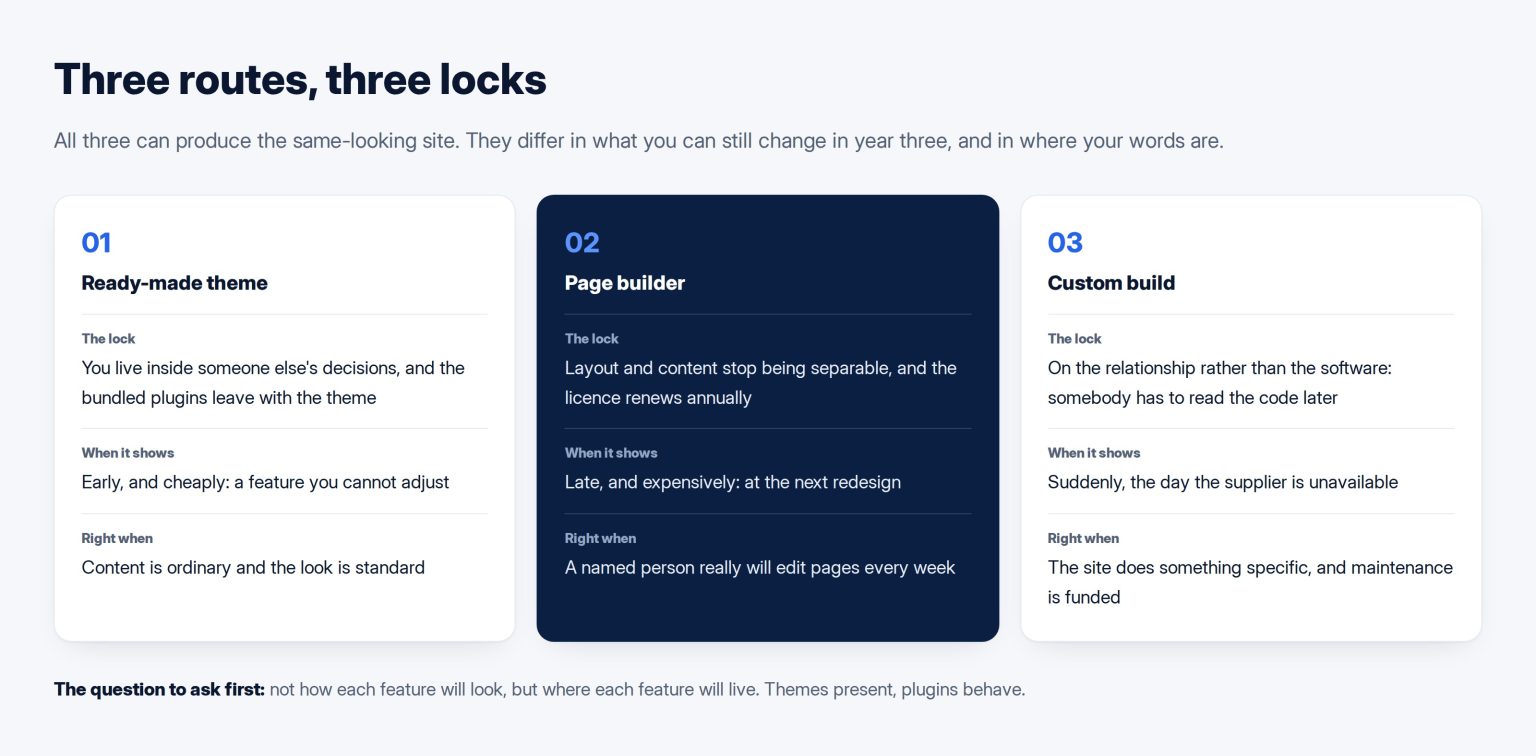
A ready-made theme is the cheapest start and the most common choice, and its lock is that you are inside somebody else’s decisions. Most of it can be adjusted; the parts that cannot will be exactly the parts you care about in month eight. The real risk is not the theme, it is the bundle: commercial themes often ship their own sliders, portfolios and page builders, and those are the features that vanish when the theme does. A theme that requires four bundled plugins to look like the demonstration is not a theme, it is a platform.
A page builder buys you the ability to change layout yourself without asking anyone, which is a real benefit and is why they are popular. Its lock is that layout and content stop being separable. You are also usually paying an annual licence for the ability to edit your own pages, which most owners do not notice until the renewal.
A custom build — a theme written for you — puts the lock on the relationship instead of on the software. Nothing constrains what the site can do, and you depend on somebody being able to read the code later. That is a real dependency and it is manageable if the code is ordinary, documented, and handed over. It becomes a trap when the build is clever, undocumented, or dependent on one person’s habits, which is the same failure the industry keeps repeating with bespoke software of any kind.
The performance cost, measured rather than asserted
People argue about builder performance in the abstract. It is measurable, and the mechanism is specific: builders produce deeply nested markup to achieve layouts that modern CSS can do with far less. Google’s own tooling flags this directly — Lighthouse warns when a page body exceeds roughly eight hundred DOM nodes and errors above about fourteen hundred. A builder-made landing page routinely lands in the second range.
That matters because it eventually shows up in the numbers Google reports about real visitors: largest contentful paint under 2.5 seconds, interaction to next paint under 200 milliseconds, layout shift under 0.1, at the seventy-fifth percentile. A heavy page does not fail those automatically, and a light page does not pass them automatically. But you should know which side of the trade you have bought, and nobody selling a builder will raise it.
The test that actually decides it
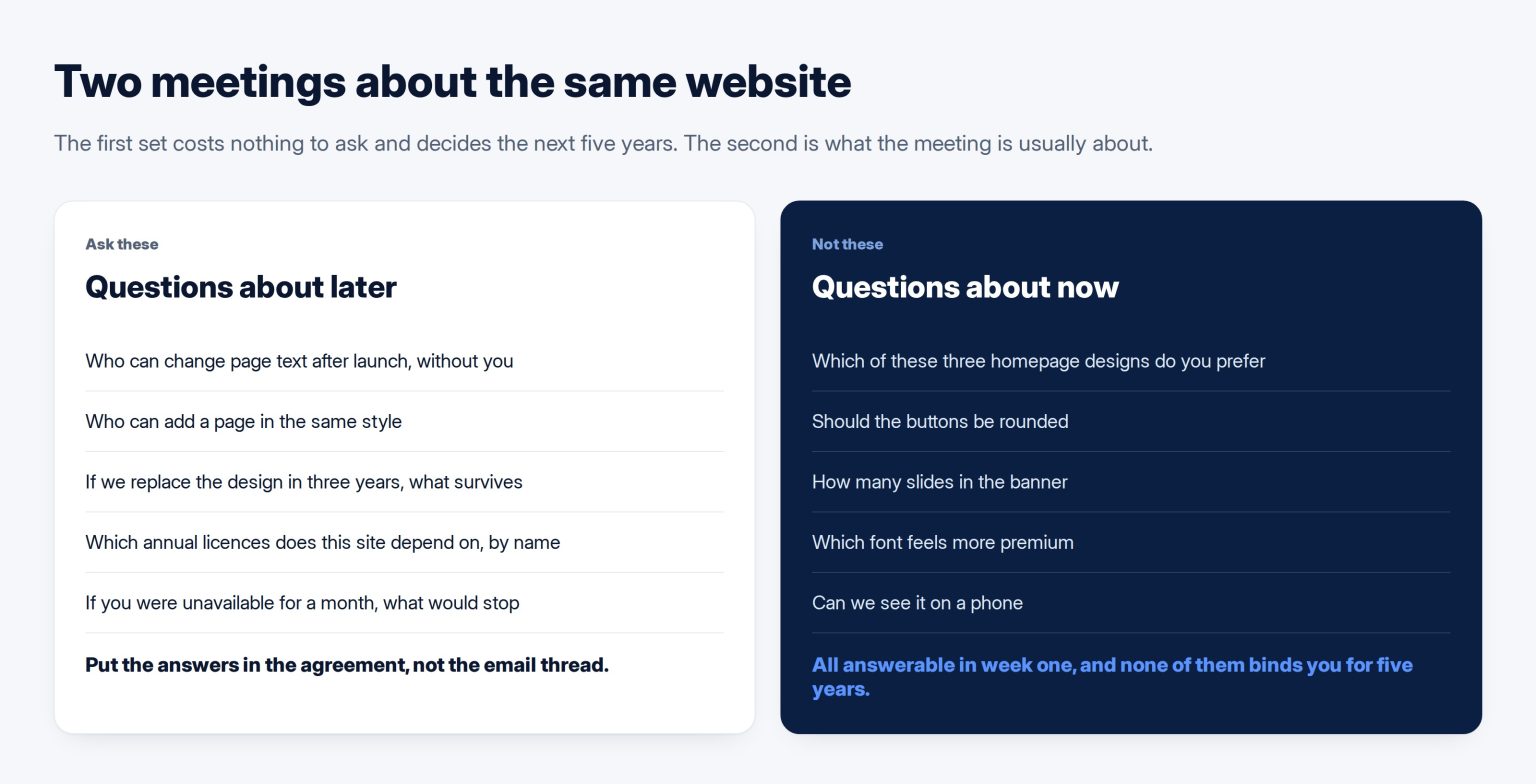
Ask the supplier five things, and write the answers into the agreement rather than the email thread.
Who can change page text after launch, and does that need you. Who can add a new page in the same style, and does that need you. If we replace the design in three years, what survives — the pages, the images, the URLs, the enquiries. What annual licences does this site depend on, by name, with prices. And if you were unavailable for a month, which of these tasks would stop.
The last one is the most revealing and the least asked. It is also the point where the difference between what design covers and what development covers stops being an abstraction, because the answer is usually that design changes stop and content changes do not, or the reverse, and you would like to know which.
What I would actually choose
For most Kuwaiti companies of ten to a hundred people, a good block theme with content in ordinary blocks, plus two or three well-known plugins for the specific things you need. It is the cheapest to run, the easiest to hand to another supplier, and it survives a change of designer without a rebuild.
A page builder is the right answer when a named person inside the company will genuinely edit pages weekly and there is no budget for a supplier retainer. That is a real situation and the trade is worth making with your eyes open. It is the wrong answer when it is chosen because it was faster for the agency to produce the mockup.
A custom build earns its cost when the site does something specific — a booking flow, a catalogue with real logic, a bilingual structure that has to stay in sync — and when the person paying for it will also pay for it to be maintained. Which is the honest framing of what a maintenance retainer should cover, and part of why two quotations for the same brief differ tenfold: they are often quoting three different routes for one description.
Whichever route you take, the deliverable that matters at handover is not the design. It is access: the hosting account, the domain, the administrator login, the licences in your own name, and an export you have run once yourself. If you are choosing this now, it belongs in the brief, and it is the part of a WordPress build most likely to be decided by default rather than deliberately.
Custom is the answer here more often than people expect, and it is what my company builds: custom WordPress at Tothiq, without a page builder underneath it.
Frequently asked questions
We already have a builder site. Do we have to rebuild?
No, and rebuilding for this reason alone is rarely worth it. What is worth doing is capping the damage: stop adding new page types in the builder, keep new content in ordinary blocks where you can, and make sure the licence is in your company’s name rather than the agency’s. Then let the decision arrive naturally at the next redesign, when you would be paying anyway, and make it deliberately that time.
Is a custom theme not always better?
Better at what. A custom theme is better at doing exactly what you need and worse at being maintained by whoever comes next, and for most sites the second matters more over five years. The honest test is whether anything about your business genuinely does not fit a standard structure. If the answer is that you want it to look distinctive, that is achievable within a standard structure and costs far less.
How many plugins is too many?
The count is the wrong measure; what matters is what each one does and how central it is. Twenty small, well-maintained plugins are less risky than one abandoned plugin holding your entire product catalogue. Judge each by a single question: if this stopped being updated tomorrow, what would break and how hard would it be to replace? Anything where the answer is “everything” deserves a second look before it goes in.
The agency says their own framework is faster to build on. Is that a problem?
It is faster for them, which is legitimate, and it becomes your problem only if nobody else can work on it. Ask whether the framework is public and documented, whether other suppliers use it, and what happens to it if the relationship ends. A private framework with a written licence to keep using it is workable. A private framework you would lose access to is a rental agreement described as a purchase.
Does any of this affect search rankings?
Not directly, and anyone claiming a theme ranks better than another is selling something. What does carry through is the indirect route: heavier pages can perform worse on the experience measures, and a site nobody can update goes stale, which is the real ranking cost. The route you choose matters to search mainly because it decides how easily you can keep publishing and fixing things for the next few years.