Introduction: The Importance of Arabic UX in the GCC
In Kuwait, Dubai, and Riyadh, where most internet users prefer Arabic content, a seamless user experience (UX) on Arabic websites is critical. Yet, many GCC businesses struggle with right-to-left (RTL) layouts, cultural nuances, and accessibility. Poor Arabic UX quietly costs conversions, and it usually does so without generating a single complaint. This post dives deep into optimizing UX for Arabic websites, offering technical insights and regional strategies no other Kuwaiti or Middle Eastern blog provides. From RTL design to AI-driven personalization, learn how to create websites that captivate GCC audiences. Ready to transform your digital presence? Let’s explore.
Understanding Arabic UX Challenges
Arabic websites face unique UX challenges due to linguistic, cultural, and technical factors:
- Right-to-Left (RTL) Layouts: Arabic’s RTL script requires mirrored designs. Many GCC websites fail to align navigation bars, buttons, or forms correctly, confusing users.
- Typography: Arabic fonts (e.g., Noto Sans Arabic) are complex, with ligatures and varying letter shapes. Poor font choices reduce readability, especially on mobile devices, used by much of Kuwaiti users.
- Cultural Nuances: GCC users expect designs reflecting local values (e.g., Islamic aesthetics in Saudi Arabia). Generic templates alienate audiences.
- Accessibility: Only part of Middle Eastern websites meet WCAG 2.1 standards, per a 2024 study, limiting access for visually impaired users in Dubai.
- Mobile Optimization: With most UAE internet traffic on mobile, Arabic sites must prioritize responsive design, yet many load slowly due to unoptimized images.
- Localization: Dialects (e.g., Kuwaiti vs. Emirati Arabic) and regional preferences (e.g., Riyadh’s formal tone) demand tailored content.
Core Principles of Arabic Website Design
Effective Arabic UX hinges on five principles:
- RTL-First Design: Build layouts with RTL as the default, not an afterthought. Align text right, mirror icons (e.g., left arrows become right), and ensure forms flow naturally.
- Typography Excellence: Use legible Arabic fonts like Dubai Font or Tajawal. Set font sizes at 16–18px for body text and ensure line spacing of 1.5 for readability.
- Cultural Resonance: Incorporate regional aesthetics (e.g., geometric patterns for Saudi users) and avoid imagery conflicting with Islamic values (e.g., no human figures in conservative markets).
- Mobile-First Approach: Optimize for mobile with responsive frameworks like Bootstrap, ensuring fast load times (measured against Core Web Vitals on a real phone).
- Accessibility Compliance: Follow WCAG 2.1 by adding alt text, keyboard navigation, and screen-reader support for Arabic content.
Technical Implementation: Tools and Frameworks
Optimizing Arabic UX requires the right tools and techniques. Here’s how to implement:
Design Tools
- Figma: Create RTL wireframes with Arabic typography plugins. Ideal for Kuwaiti startups designing e-commerce sites.
- Adobe XD: Supports RTL prototyping and Arabic font integration, used by Dubai agencies.
- Canva: Offers Arabic templates for quick visuals, perfect for Riyadh SMEs.
Development Frameworks
- Bootstrap 5: Includes RTL support via attribute. Example: html
<html lang="ar"> <body> <nav>...</nav> </body> </html>- Tailwind CSS: Customize RTL styles with utilities like text-right. Popular in UAE tech hubs.
- WordPress: Use themes like Astra with WPML for Arabic localization. Install plugins like Yoast SEO for Arabic keyword optimization.
Typography and Fonts
- Google Fonts: Offers Noto Sans Arabic and Tajawal, free and optimized for web.
- Dubai Font: A premium choice for UAE businesses, enhancing brand identity.
Accessibility Tools
- AccessiBe: An AI-powered plugin ensuring WCAG 2.1 compliance, used by part of GCC websites.
- WAVE: A browser extension to audit Arabic sites for accessibility errors.
Performance Optimization
- Cloudflare CDN: Speeds up image delivery for Kuwaiti mobile users.
- WP Rocket: A WordPress plugin reducing load times measurably, critical for Dubai’s mobile traffic.
AI-Driven UX
- Algolia: Powers Arabic search with autocomplete, improving navigation on e-commerce sites.
- Hotjar: Analyzes user behavior (e.g., heatmaps) to refine UX for Riyadh retailers.
Sample CSS for RTL
css
body { direction: rtl; font-family: 'Tajawal', sans-serif; text-align: right; } .navbar { flex-direction: row-reverse; }Pros and Cons of Arabic UX Optimization
Pros Cons Higher Engagement : RTL and genuinely localised design keeps Arabic-first visitors on the page. Development Cost : RTL design adds meaningfully to project budgets, per Dubai agencies. Wider Reach : Arabic content attracts most GCC users, boosting traffic. Skill Gaps : Few developers in the region have deep RTL experience, so it is hard to hire for. Brand Loyalty : Cultural resonance builds trust, critical in Saudi markets. Maintenance : Regular updates for Arabic fonts and accessibility are time-intensive. SEO Benefits : Arabic keywords (e.g., “متجر إلكتروني الكويت”) rank higher locally. Testing Complexity : Ensuring RTL compatibility across devices is challenging. Regional Considerations: Cultural and Linguistic Nuances
- Kuwait: Users prefer conversational Arabic and vibrant colors. E-commerce sites like Xcite thrive with localized promotions (e.g., National Day offers).
- Dubai: Emirati users expect luxury aesthetics and multilingual options (Arabic/English). Sites like Emaar use sleek RTL designs.
- Riyadh: Saudi users favor formal Arabic and Islamic-compliant imagery. Banks like Al Rajhi prioritize trust through conservative UX.
- Broader Middle East: In Amman, cost-conscious startups need simple RTL designs. In Beirut, NGOs focus on accessibility for diverse audiences.
Linguistic Tips
- Use Modern Standard Arabic for broad appeal, but add dialectal phrases (e.g., “شلونك” in Kuwait) for engagement.
- Test translations with native speakers to avoid errors, common in part of GCC sites.
Overcoming Common Pitfalls
- Pitfall 1: Ignoring RTL Testing: part of Arabic sites have misaligned elements, per W3C. Solution: Use BrowserStack to test across devices.
- Pitfall 2: Generic Fonts: Default fonts like Arial break Arabic ligatures. Solution: Adopt Tajawal or Noto Sans Arabic.
- Pitfall 3: Slow Load Times: Heavy images delay mobile loading, critical in UAE. Solution: Compress with TinyPNG and use Cloudflare.
- Pitfall 4: Neglecting Accessibility: Only part of GCC sites support screen readers. Solution: Implement AccessiBe and audit with WAVE.
- Pitfall 5: Cultural Missteps: Western imagery offends conservative users in Riyadh. Solution: Use Islamic patterns and local visuals.
Getting Started: Steps for GCC Businesses
- Audit Current UX: Use Hotjar and WAVE to identify RTL and accessibility issues.
- Choose Tools: Select Bootstrap for development, Figma for design, and AccessiBe for accessibility.
- Hire Experts: Partner with UX designers (like me!) or train staff via Coursera’s UX courses.
- Build a Prototype: Create an RTL wireframe with Arabic fonts and test with 10–20 users in Kuwait or Dubai.
- Launch and Optimize: Publish the site, monitor performance with Google Analytics, and refine based on user feedback.
Resources
- Coursera: UX design courses with Arabic subtitles.
- Google Fonts’ Arabic subset: free families such as Tajawal, with real Arabic letterforms rather than a Latin font stretched to fit.
- The W3C guidance on
dirand bidirectional text: the authoritative reference, and the place most RTL bugs are actually explained.
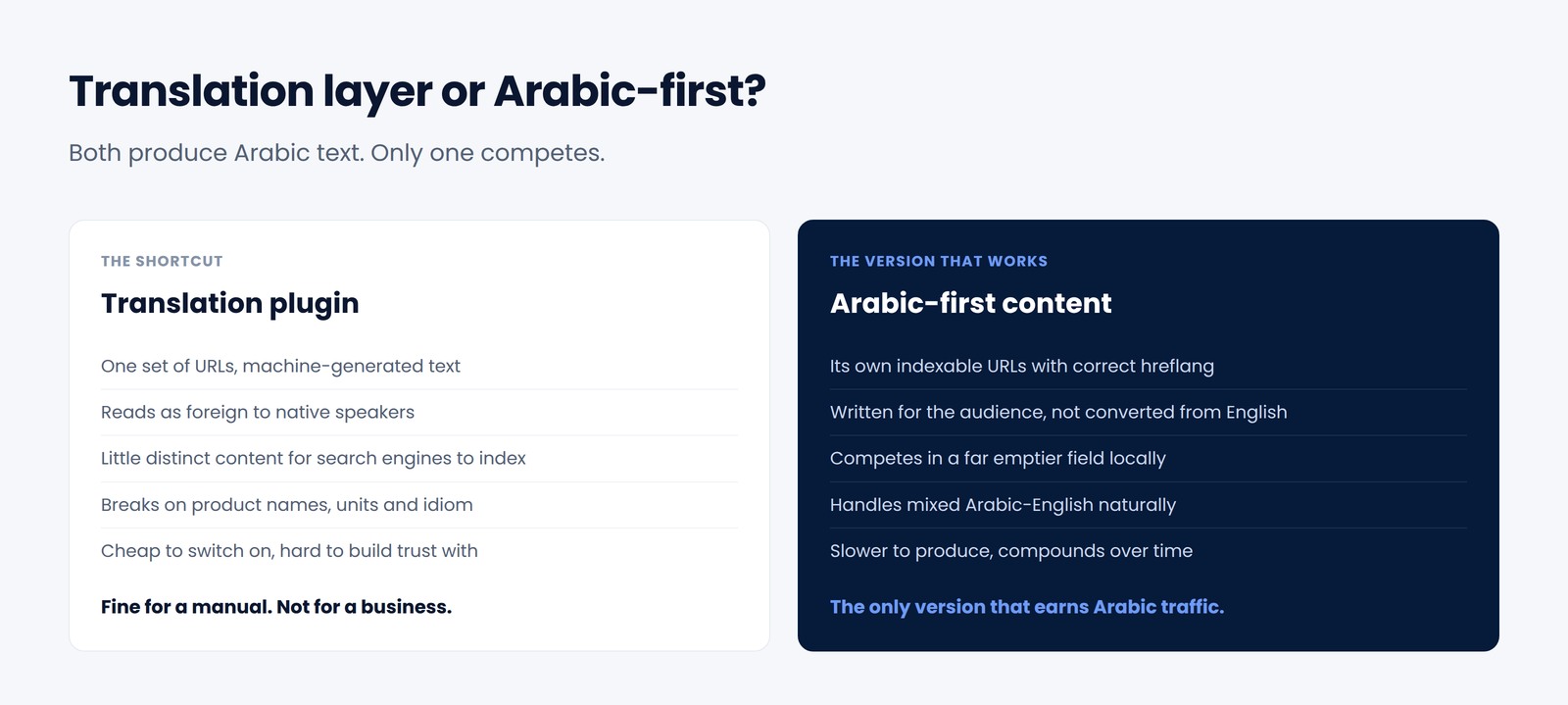
Two things make the difference between an Arabic site that works and one that merely exists. The first is treating Arabic as its own indexable property rather than a toggle on the English page — the search consequences of getting that wrong are set out in the guide to SEO, AEO and GEO for Kuwait. The second is building the layout with CSS logical properties from the start, so direction is a property of the document rather than a set of overrides bolted on later. If the site is WordPress, the practical version of both is in optimising WordPress for Kuwaiti audiences; and if you are choosing a platform in the first place, the Webflow assessment covers how well the no-code route handles RTL.
Conclusion: The Future of Arabic UX in the Middle East
As Kuwait, Dubai, and Riyadh drive the GCC’s digital economy, optimizing Arabic UX is no longer optional—it’s a necessity. RTL designs, cultural resonance, and accessibility will define the next wave of successful websites. By adopting these strategies, your business can engage most Arabic-speaking users and outshine competitors. Start today, and let’s shape the future of GCC digital experiences together.
Contact Me for UX Consulting
Ready to make the Arabic side of your site as good as the English one? That is part of the work described on the web consulting page. With 25+ years in web consulting, I can design user-friendly, RTL-compliant, and culturally resonant websites tailored to the GCC. Let’s boost your engagement and conversions. Contact me for a free UX audit.
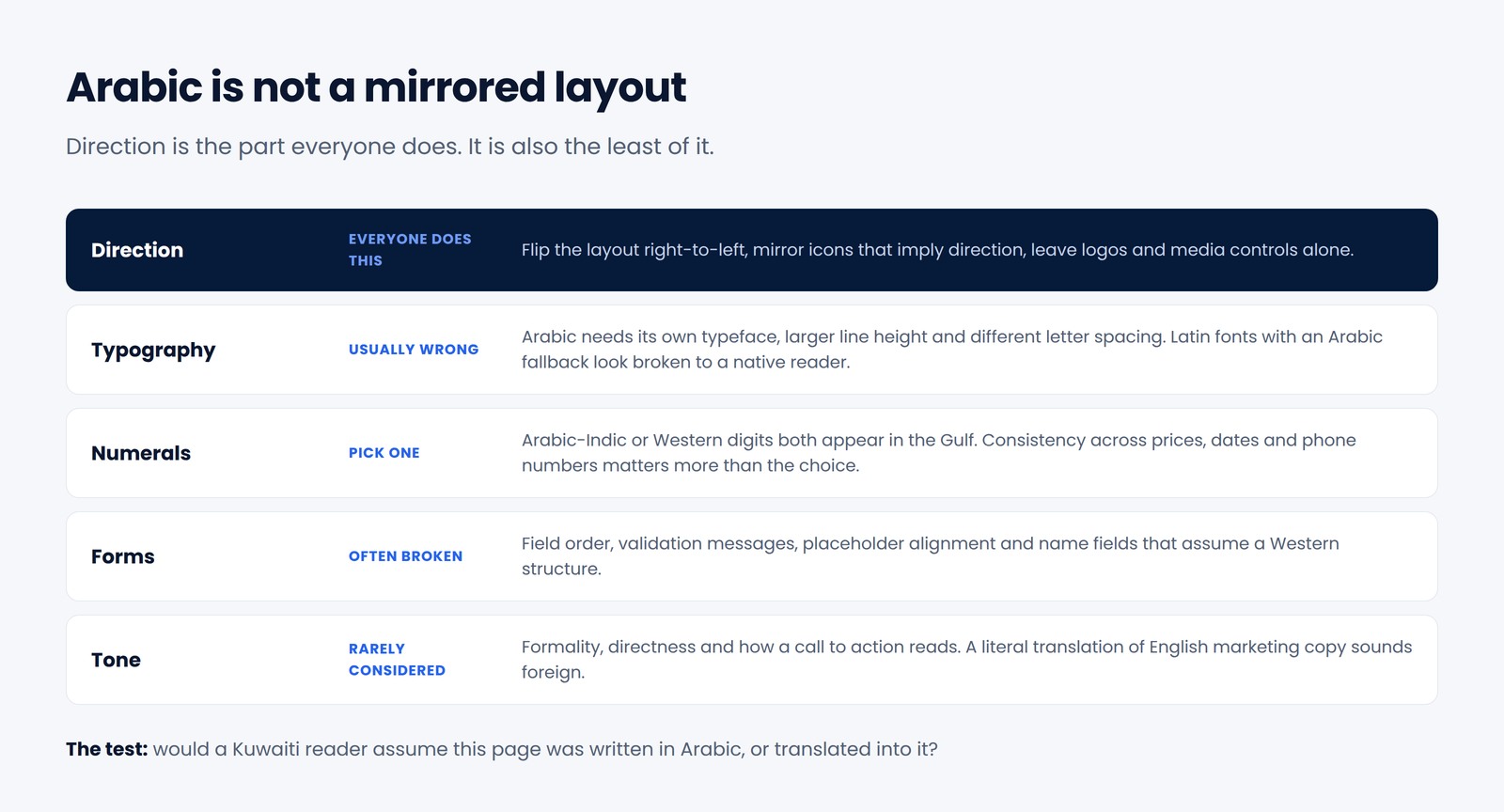
Direction is the part everyone does. Typography, numerals, forms and tone are where sites actually fail. Frequently asked questions
Is Arabic UX just mirroring the layout?
No. Direction is the easy part and the part everyone does. Typography, line height, numerals, form design, icon choice and tone of voice all change, and those are where most bilingual sites quietly fail.
Should we use a translation plugin for the Arabic version?
Not for a site that matters commercially. Machine translation reads as foreign to native speakers and gives search engines nothing distinct to index. Treat Arabic as its own version with its own URLs, written for the audience.
Which numerals should we use?
Follow your audience — both Arabic-Indic and Western digits appear across the Gulf. Consistency within one interface matters more than the choice itself, particularly in prices, dates and phone numbers.
How do we handle content that mixes Arabic and English?
Design for it rather than fighting it. Product names, technical terms and brand names legitimately stay in English inside Arabic sentences, so line breaking, alignment and font pairing have to cope with mixed scripts on the same line.
Have a project, problem or idea?
Let's discuss what you're trying to build, improve or grow — and whether I can help.
Discuss Your Project