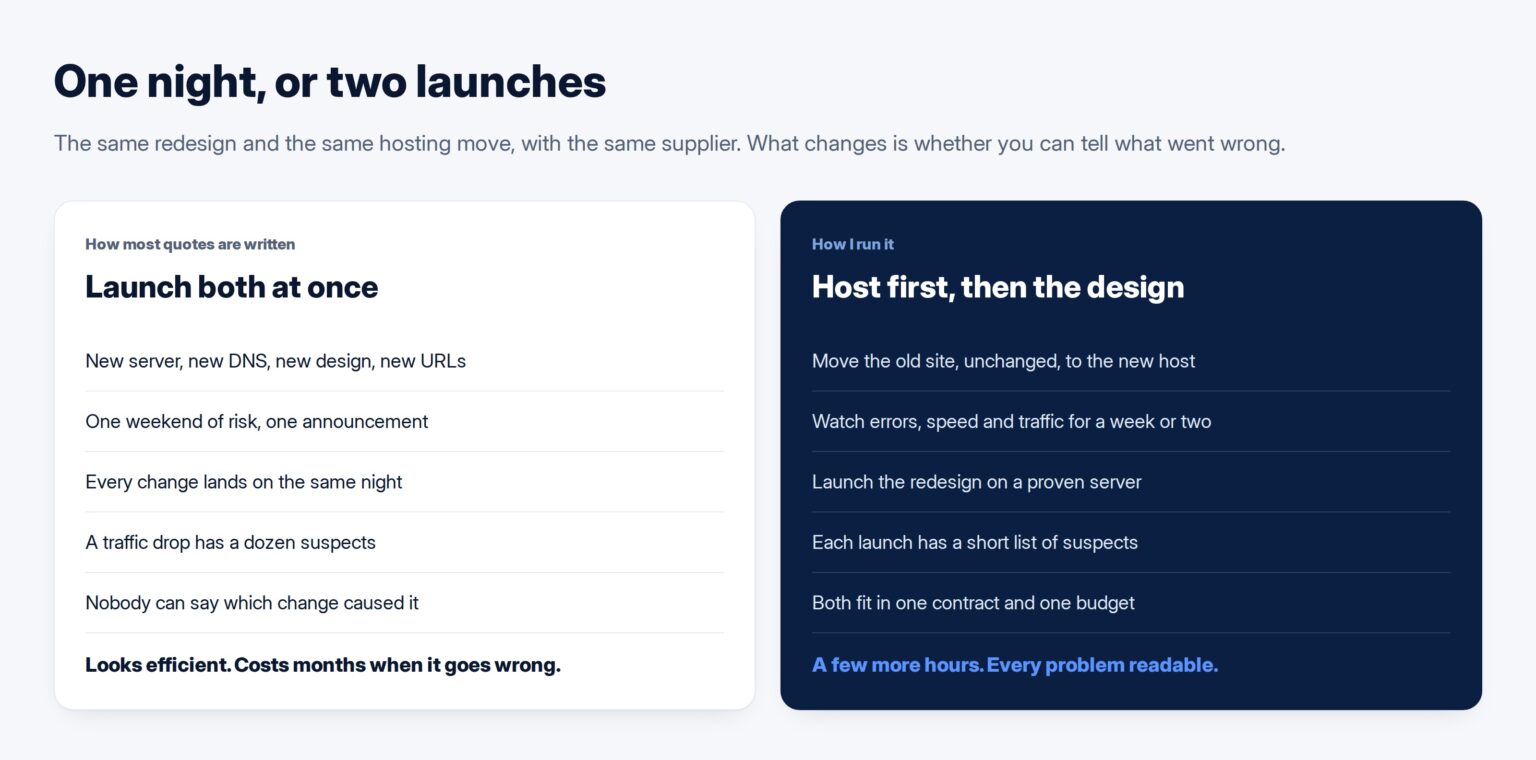
When a Kuwaiti company commissions a new website, the new supplier usually brings its own hosting, so the redesign and the move to a new server arrive as one project with one launch date. That is how most quotes are written and how most proposals present it. It is also the single most reliable way I know to lose search traffic and never find out why.
My advice is to keep them in one contract and split them into two launches. Here is the reasoning, and the order I run it in.
Why the two arrive bundled
The bundle is rarely a decision. The old hosting renews in the same month the new site is due, or the new agency only supports sites on its own servers, or the old supplier is being replaced and nobody wants to deal with them twice. All of these are reasonable, and none of them is a reason to change everything on the same night.
It also looks efficient on paper. One launch, one weekend of risk, one announcement. The trouble is that the risk is not added together; it is multiplied, because when something goes wrong afterwards you cannot tell which change caused it.
Change one thing at a time
This is not only my preference. Google’s own guidance on moving a site says to plan changes one after the other rather than at the same time, and gives exactly this example: if you are changing the domain, the system and the layout, do them one at a time.
The logic is diagnostic. A new design changes the URLs, the page content, the internal links and the templates. A hosting move changes the server, its speed, its configuration and every DNS record. If traffic drops by a third three weeks after doing both at once, the list of suspects is every one of those things. If you did them a fortnight apart, you already know which one it was.
Move the host first, with the old site
The order I use: move the existing site, unchanged, to the new hosting. Watch it for one to two weeks. Then launch the redesign on hosting that is already proven.
A hosting move with no visible change is the simpler of the two, and Google treats it that way. Its guide to changing your hosting is four steps: prepare the new infrastructure, switch DNS, monitor both, shut the old one down once nobody is using it. Done alone, it is measurable. The pages are identical, so any change in speed, errors or traffic is the server’s doing.
The redesign then lands on a server whose behaviour you already know, and any change after that launch belongs to the design, the content or the URLs. Two small, readable events instead of one large confusing one.
Everything the domain does besides the website
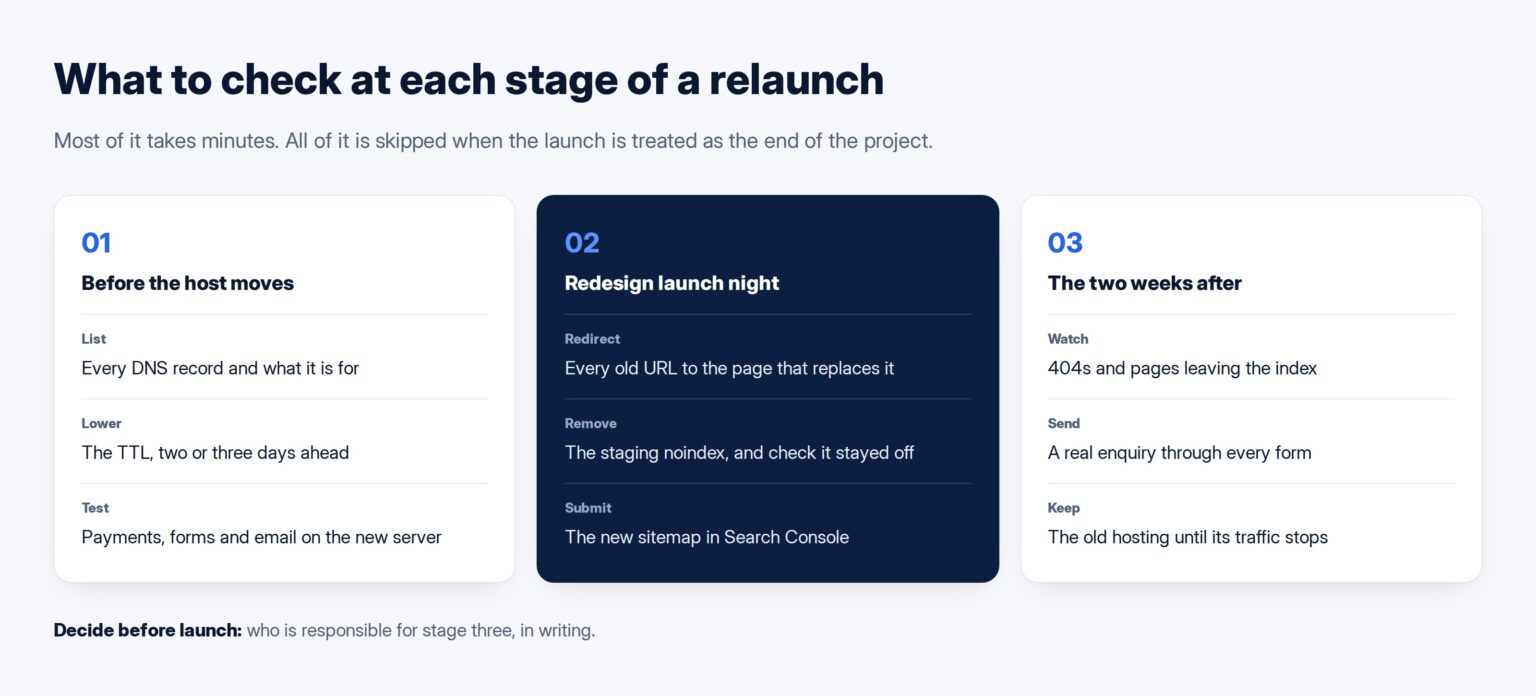
Before the host moves, list every DNS record on the domain and what each one is for. The website is usually a record or two. The rest is email, the verification records Google and Microsoft use, subdomains nobody remembers creating, and whatever a payment provider or booking system points at.
Email is the one that stops the business. When a new host takes over the DNS and the mail records are not copied across exactly, mail starts going nowhere, often quietly. Google’s own MX record instructions warn that email may not work correctly if old or incorrect MX records are left in place. Copy them, then send a test message from outside the company before calling the move done. A proper supplier handover should already have given you this list; if it did not, this is where the gap shows.
Check anything that calls back to the site as well. A payment gateway that returns the customer to a success page, the KNET setup your bank approved, a form that posts to a CRM: each is configured somewhere with an address or a server, and each needs testing on the new host before real customers find out.
Lower the DNS TTL days before
Every DNS record carries a time to live that tells resolvers how long to cache it. If it is set to a day, some of your visitors will keep reaching the old server for up to a day after you switch. Google’s hosting guide recommends lowering the TTL ahead of the move, and Cloudflare’s explanation of TTL sets out the trade-off plainly: longer values mean faster lookups, but slower changes.
Lower it to a few minutes two or three days before the move, so the old long value has expired everywhere. Keep the old hosting running until traffic to it has actually stopped. Cancelling it the same day is how a business ends up with a site that works for half its customers.
The redirect map is the redesign’s real deliverable
When the redesign launches, every old URL that the new site does not keep needs a permanent redirect to the page that replaces it. Google’s guide calls this the URL mapping and puts it before the move starts, not after. This is the same principle as never changing a URL that already earns something, applied to the whole site at once.
Keep it boring. A redirect should go to the one page that answers the same question, not to the home page. Sending every retired URL to the home page looks tidy, and Google’s guide says it might be treated as a soft 404, which is a missing page by another name. The history attached to those URLs goes nowhere.
Build the map from the old site’s real list of pages: its sitemap, its Search Console pages report and its analytics, not from the new site’s menu. The pages that bring in traffic are often ones nobody would put in a menu. Ask for the map as a written file before launch, and test it after: request every old URL and confirm each one arrives somewhere sensible in a single step.
Pick the launch by your traffic, not the supplier’s calendar
Google’s guidance is to time a move to coincide with lower traffic where you can. For most Kuwaiti businesses that rules out a surprising number of dates: the weeks before Ramadan and Eid for retail, the end of the month for anything that takes payments, the start of the school term for anything families buy. Open the analytics, find the quietest recurring stretch, and put both launches inside it.
Then pick the day of the week. Launching on a Thursday afternoon means the problems surface on Friday and Saturday, when neither your team nor the supplier is at a desk. A Sunday or Monday morning gives you a full working week of people watching. It is an unglamorous rule and it prevents more weekend emergencies than anything else on this list.
Give the hosting move and the redesign their own dates in the project plan from the start. When they are two lines in the schedule, nobody is tempted to merge them to save a week at the end.
The staging site must not follow you to launch
A new site is built on a staging copy, and a staging copy should be hidden from search engines with a noindex rule. That is correct. The failure is launching with it still on. Google’s documentation on noindex is blunt about the effect: when Google finds it, the page is dropped from results entirely. On a whole site, that is every page.
In WordPress it is a single checkbox, “Discourage search engines”, and it is the most common relaunch fault I see. Check the source of the live home page on launch day, and check it again the next morning, because a cache or a deployment script can put it back.
The first two weeks after launch
Google says a medium-sized site can take a few weeks or more before the new URLs replace the old ones, so a wobble in the first days is normal. What is not normal is growth in 404 errors, pages dropping out of the index, or forms that stopped arriving. Look at Search Console’s pages report and crawl errors every couple of days, submit the new sitemap on launch day, and have someone send a real enquiry through every form.
Write down, before launch, who is responsible for these two weeks. If the contract ends at “site delivered”, nobody is. This is the part of the work a website proposal most often leaves out, and it is worth a line in the scope rather than a favour asked afterwards.
Where you want one supplier to plan and run the rebuild, the hosting move and the two weeks after, Tothiq’s website design and development service takes it on as one project with separate launches.
Frequently asked questions
Is it cheaper to do the redesign and hosting move together?
Slightly, in supplier time, because there is one launch window instead of two. It is far more expensive if something goes wrong, because nobody can tell which change caused it. The second launch costs a few hours; an unexplained traffic drop can cost months.
How long should we wait between the hosting move and the redesign launch?
One to two weeks is usually enough to see that the new host is stable: errors, speed and traffic back to their normal pattern. Longer is fine. The point is to launch the redesign on a server you already trust.
Will our email stop working when we change hosting?
Only if the mail records are not carried across. List every DNS record before the move, copy them exactly, and send a test message from an outside address afterwards. If email is hosted with Google or Microsoft rather than the web host, it should not change at all.
Do we lose our Google rankings with a new design?
Not if the URLs that earn traffic are kept or permanently redirected to the pages that replace them, and the new site is not blocked from indexing. Expect movement for a few weeks. A lasting loss usually means a missing redirect or a noindex left on.
Should we keep the old hosting after the move?
Yes, until it has stopped receiving traffic, which is usually a few days after the DNS change. Cancelling it on launch day means anyone still reaching it through an old cached record finds nothing.